
X 92 Game Apk Download Free in Pakistan For Android 2026
11 Oct 2026
8.1MB
V1.0.3
Android 5.1+
2000+
Description
X 92 Game brings several game collections, account options and activity pages into one mobile interface. Its dark background, red controls and fixed bottom menu give each main area a clear place. Users can browse the home page, open account forms or move between sections without returning to the top.
The X92 layout includes more than a library of titles. Download choices, profile shortcuts, event filters and support links also appear across the platform. Understanding these areas helps readers distinguish ordinary navigation from account features and banner messages.
What Does X 92 Game Bring Together?
X 92 Game uses a scrolling dashboard to arrange individual titles alongside provider collections. Some entries represent a single game, while others group content under a provider name. This distinction matters because similar artwork does not always mean two cards open the same collection.
The interface also includes registration and login panels, a download window and a separate activity area. A visitor can see several account shortcuts before signing in, although their presence does not confirm access to every feature. The profile page asks visitors to log in or register first.
Finding Your Way Around the Dashboard
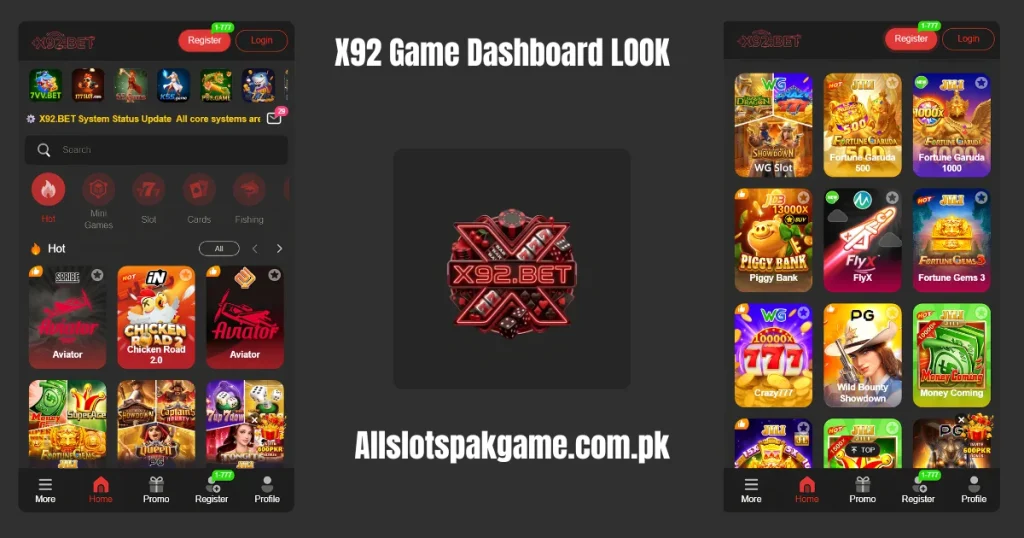
The X 92 Game home page places its logo and account buttons at the top. A row of small platform icons follows, with an announcement strip and a search box underneath. Category icons then lead into larger game cards arranged across three columns.
X92 uses red to mark the selected area. The bottom bar contains More, Home, Promo, Register and Profile, keeping the main routes visible while the page scrolls. A floating Top button appears farther down and offers a shortcut back toward the beginning.
Small floating banners can cover part of the lower content. Where a close control appears, dismissing that panel can make nearby labels easier to read. This is particularly useful when several cards sit close to the bottom navigation.
Different mobile game platforms arrange their dashboards and navigation menus in different ways. Our 2V Game guide offers another example, explaining its game collections, account sections, and profile shortcuts.
Search, Card Labels and Browsing Controls
X 92 Game places Search above the category row. This gives readers a visible starting point when they already know a title, rather than scrolling through the whole library. The available view does not establish which spellings or partial terms the search accepts.
Several cards carry Hot or New labels, while others display a star or thumbs-up symbol. These marks help separate entries visually, but they do not establish quality, popularity or suitability. Section headings also include All buttons and arrow controls for moving through grouped content.
How the Main Collections Differ
X 92 Game separates its library into recognizable areas. The following groups explain the visible organization without making claims about individual results or performance:
- Hot: A mixed selection appears near the beginning of the dashboard. It includes entries with different artwork and provider names rather than one consistent game style.
- Mini Games: Cards show collections associated with Spribe, WG, JILI, INOUT, 2J and PP. Provider labels help distinguish similar themes within this row.
- Cards: JILI Cards, WG Cards and KingMidas Cards appear as separate collections. Their preview artwork combines several table and card themes.
- Fishing: JILI, WG and JDB collections use underwater characters and marine artwork. These entries sit together beneath their own heading.
- Live: A separate row groups studio-style previews. Its placement distinguishes this content from the illustrated collections elsewhere on the page.
- Sports: Three cricket-themed cards appear under this heading. The displayed names include 9Wickets, WG and SABA, with the word “SPROT” used in the labels.
Provider collections and individual titles share the same grid style. Reading the text beneath each image therefore gives more context than relying on the artwork alone.
X 92 Game Download Choices Explained
The X 92 Game download window contains two Android-marked options: Quick APP (10Kb) and Speed App (7.2M). The smaller option also displays an Auto login checkbox. These are the labels shown in the panel, rather than confirmed version numbers or complete installation requirements.
X92 does not provide a minimum Android version in this window. The size labels also do not establish the installed storage requirement. Extra resources or later updates may affect the space an application uses after installation.
Before opening an APK, check its source, package details and requested permissions. A smaller file alone does not prove stronger security or better speed. The visible panel does not establish an iPhone package or a dedicated desktop version, so those options should not be assumed.
Registration Fields and Agreement Controls
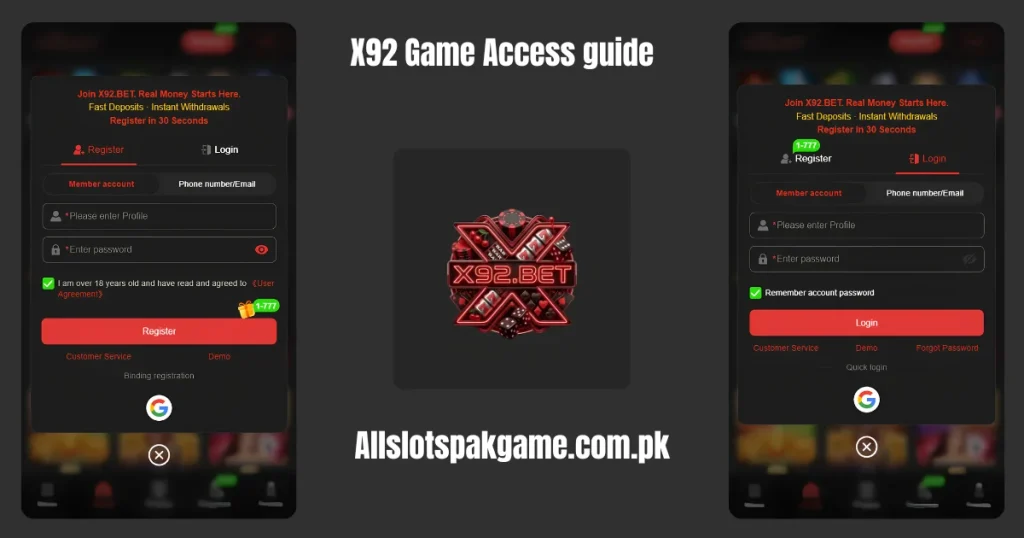
X 92 Game provides Member account and Phone number/Email tabs within the registration panel. The displayed Member account form contains a field labelled “Please enter Profile” and a password field. An eye icon sits beside the password entry.
The form includes an agreement checkbox stating that the user is over eighteen and accepts the User Agreement. Read that agreement before submitting personal details. X92 also displays Customer Service, Demo and a Google icon beneath the main button, though their appearance alone does not explain every requirement attached to them.
Login Options and Password Handling
The X 92 Game login panel follows a similar layout, with Member account and Phone number/Email choices. Its visible form asks for an account entry and password. A Remember account password checkbox appears above the red Login button.
Customer Service, Demo and Forgot Password links sit below the form, followed by a Google quick-login icon. On a shared device, avoid leaving remembered credentials available to the next person. If access fails, use the recovery or assistance option instead of repeatedly trying uncertain passwords.
X 92 Game Promo Tabs and Event Filters
X 92 Game organizes the Promo area with Event, Mission, VIP, Rebate and Unclaimed tabs across the top. Event is selected in the available view. A left sidebar contains All, New User, Agent, VIP and Contact Us filters.
Below these filters are History, Refresh rewards and Redeem Code controls. X92 presents large event banners beside the sidebar, so users may need to scroll through a long list. Invitation-themed cards appear repeatedly, alongside new-member notices, daily challenges and other activity messages.
The layout makes the top tabs and sidebar filters separate controls. Selecting a main tab changes the area being explored, while the filters offer narrower groupings within the displayed event section. Detailed conditions still need to be read on the relevant page.
Reading Activity Labels With Care
X 92 Game displays amounts, percentages and timing claims on some banners. Treat these as platform statements that require their own terms, rather than evidence that every account qualifies. A headline can leave out eligibility rules, expiry dates or other conditions.
Likewise, Mission, VIP, Rebate and Unclaimed are visible navigation labels. Their detailed contents are not established by the Event view. A Refresh rewards button does not itself confirm an account credit, and an advertised code should not be described as valid without checking its conditions.
Profile Shortcuts and Security Entries
The X 92 Game profile page begins with a visitor avatar and Login and Register buttons. A row beneath it contains Withdraw, Deposit, Interest, Fund and Coupon shortcuts. These labels identify account areas; they do not confirm payment availability, processing times or protection of funds.
Further down, the page lists My Records, Manage withdrawal, Invite, Profile, Security Center, Find us, Language, FAQ, Reward Feedback and Login device. X92 shows English beside Language. Security Center and Login device deserve separate attention because their names suggest different account-management purposes, although their internal controls are not displayed here.
Records and Help Links Have Different Roles
X 92 Game places My Records and Manage withdrawal near the top of the profile list. The description beside My Records mentions details, records, reports and balance recovery. Read the actual entry before assuming which history or reporting tools it contains.
Support routes also appear near the bottom of the home page. Online Support, Help Center and Reward Feedback are listed separately. For a technical problem, explain what happened, which page was involved and any error message shown. Keep passwords and private account credentials out of feedback submissions.
Practical Advantages and Limitations
| Pros | Cons |
|---|---|
| Fixed navigation keeps the main sections accessible. | Floating panels can cover nearby content. |
| Provider labels help distinguish collections. | Some card names contain spelling errors. |
| Download choices show separate size labels. | Minimum device requirements are not listed there. |
| Event filters offer several browsing routes. | Banner headlines do not explain full conditions. |
| Profile groups records, settings and assistance links. | Visitor views do not reveal every account control. |
Five Additional Questions
Can browser zoom make small labels easier to read?
Yes. Browser zoom or accessibility settings may enlarge text, although some page elements can shift or overlap.
Will airplane mode keep online pages working?
Generally, no. A loaded page may remain visible, but online requests need an active connection.
Does removing X 92 Game automatically close its account?
No. Uninstalling normally removes local software. Account closure requires checking the service’s separate process.
Can a password manager fill the account form?
It may, depending on the browser, device and form design. Check the destination before accepting saved credentials.
Will turning a phone sideways change the layout?
Possibly. Browser pages may rearrange in landscape orientation, but a dedicated landscape interface is not confirmed.
Final Overview
X 92 Game combines a provider-based library with download, account, activity and assistance menus. X92 readers can use this guide to understand the visible layout while checking package details, agreements and feature conditions separately. Access information carefully and respect the eighteen-plus requirement shown in registration.
Download links
How to install X 92 Game Apk Download Free in Pakistan For Android 2026 APK?
1. Tap the downloaded X 92 Game Apk Download Free in Pakistan For Android 2026 APK file.
2. Touch install.
3. Follow the steps on the screen.