
2V Game APK Download Free in Pakistan For Android 2026
11 Oct 2026
15 MB
V.3.0
Android 5.0+
3000+
Description
2v Game brings a game library, account forms, activity pages and personal controls into one mobile layout. Its dark background, purple cards and bright pink buttons give each section a clear visual identity.
This guide explains how 2v Game arranges its menus, download choices and account sections. A displayed amount, percentage or activity banner does not confirm what an account will receive.
What the Platform Brings Together
2v Game works as a central interface for different provider collections and individual titles. Visitors can move between the library, Promo area and Profile using the bottom menu.
Some sections remain visible while signed out, although personal information requires account access. The interface includes an age confirmation during registration. It is intended for adults aged 18 and above, and users should set sensible limits on their time and spending.
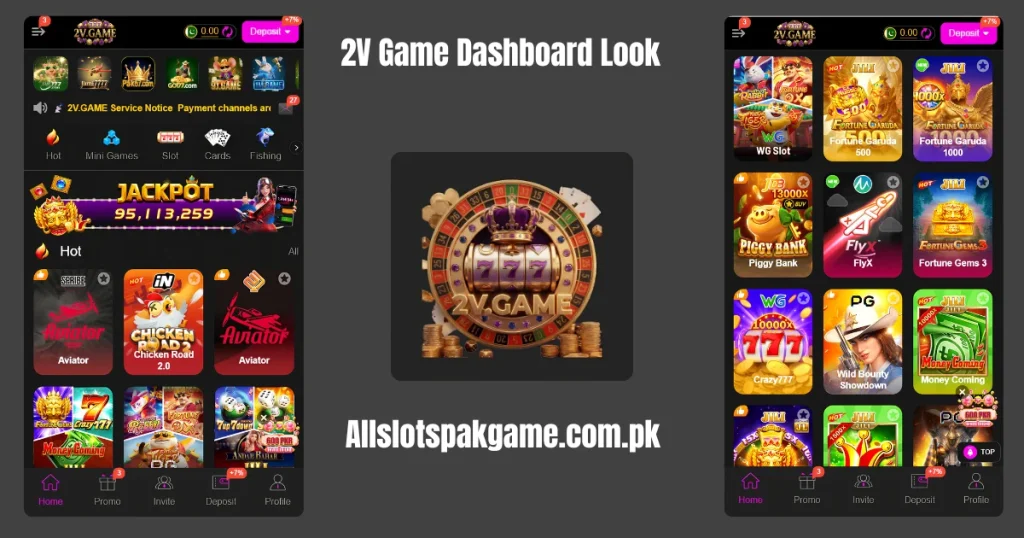
A Closer Look at the Home Layout
The top of 2v Game places the brand logo beside Login and Register buttons. Below this row, small platform icons sit above an announcement strip.
The 2V dashboard displays game cards in three columns. Titles appear beneath the artwork, while some entries carry Hot or New markers. Star icons also appear on several cards, but their exact behaviour needs checking within the interface.
Large banners divide parts of the page. Further down, a floating TOP button offers a visible route back toward the beginning. Different mobile game platforms arrange their home screens and navigation tools in their own ways. Our 288Win Game guide provides another example, covering its interface, account access, and download options.
Five Shortcuts Along the Bottom
The bottom bar of 2v Game contains Home, Promo, Login, Register and Profile. The selected section uses a pink icon and label, making the current location easier to recognise.
These shortcuts stay visible across the 2V pages provided. Home returns to the collections, while Promo opens the activity area. Login and Register display their respective forms. Profile leads to account tools and shows a sign in request when no account is active.
How the Library Separates Its Collections
The library in 2v Game uses category headings, provider cards and individual entries.
- Hot: This area includes titles such as Aviator, Chicken Road 2.0, FlyX and Piggy Bank, alongside larger provider collections.
- Mini Games: Cards include Spribe Blockchain, WG Blockchain, JILI Blockchain, INOUT Blockchain, 2J Blockchain and PP Blockchain.
- Slot: Provider collections include JILI, PG and WG. Individual entries also appear elsewhere in the library with their own artwork.
- Cards: JILI Cards, WG Cards and KingMidas Cards appear together. An expansion label indicates additional entries beyond the first row.
- Fishing: JILI Fishing, WG Fishing and JDB Fishing use illustrated cards, with more entries available through the expansion control.
- Live: A separate heading identifies this collection beneath Fishing. The visible page does not explain each provider’s features.
- Sports: The first row includes 9Wickets Sports, WG Sports and SABA Sports, followed by an option to expand the group.
The Blockchain wording on 2V cards is a displayed collection label. It does not, by itself, explain the technology behind a title or establish how its account data is handled.
Understanding the Three Download Choices
The download window in 2v Game lists Quick APP (10Kb), Desktop shortcut and Speed App (7.5M). An Auto login checkbox appears inside the Quick APP option.
The 2V panel does not provide a complete specification table. Its size labels are not version numbers, and the Desktop shortcut label does not establish that a full computer application is available.
Before choosing a package, check the file source, installation details, permissions and device requirements. Disable automatic account access on a device that other people use.
Registering an Account on 2v Game
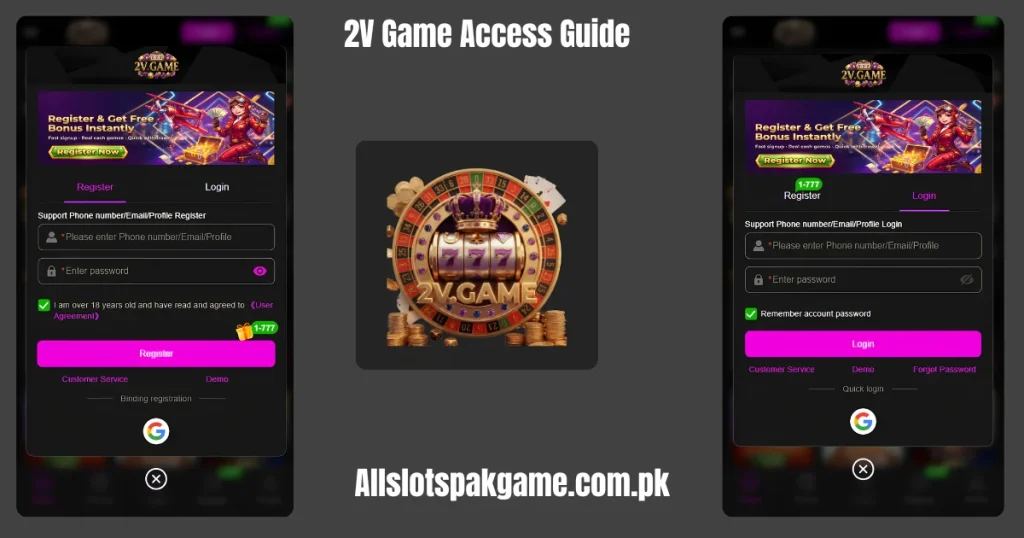
The registration window contains a field labelled for a phone number, email or profile identifier. A second field accepts a password and includes an eye icon.
Below these fields, an age checkbox refers to the User Agreement. Read that agreement before accepting it. The main Register button sits underneath, followed by Customer Service and Demo links.
A Google icon appears under Binding registration. Its presence shows an alternative account option, although the complete linking process is not explained in the form.
Login Controls and Password Recovery
The login form in 2v Game uses an account identifier field and a password field. It also shows a Remember account password checkbox, a main Login button and a Forgot Password link.
The 2V login window places Customer Service and Demo below the main button. A Google icon appears beneath Quick login. Choose the method linked to your existing account rather than creating another profile when access fails.
If a password stops working, open the recovery option and follow its instructions. Never share a password or verification code with someone offering unofficial help.
Finding Your Way Around the Promo Page
The Promo area of 2v Game has five tabs across the top: Event, Mission, VIP, Rebate and Unclaimed. Event is selected in the available view. The other tab names identify routes to separate sections, without revealing their full contents.
A left menu on the 2V activity page includes All, New User, Agent, VIP and Contact Us. Additional buttons provide History, Refresh rewards and Redeem Code.
Read the details inside an activity before treating its banner as a complete explanation. Eligibility, timing and account conditions may require information beyond the large headline.
Reading Activity Cards Without Guessing
Event cards on 2v Game cover friend sharing, codes, sign in activities, user guidance and ranking themes. Other cards refer to card collection, invitation tasks and draw activities.
Amounts shown in PKR belong to the banner text. They do not establish availability for a particular person. Similarly, a reference to a Telegram channel does not verify the validity of a code found elsewhere.
Use History when investigating earlier activity entries, and inspect any accompanying explanation. Refresh rewards is a visible control, but its label alone does not explain how often records update or whether an account meets the stated conditions.
Keeping VIP and Rebate Labels in Context
2v Game provides dedicated VIP and Rebate tabs alongside related event cards. One banner shows a maximum return of 3%, while a separate agent card displays another percentage. These figures refer to different labelled items and should not be combined.
A VIP card also mentions a WhatsApp channel for information. Check the destination before opening an external contact route. The page does not establish that every account receives the same privileges, rates or access conditions.
Where Personal Account Tools Appear
The Profile page of 2v Game begins with Login and Register buttons. Beneath them, the account area asks visitors to sign in. A row of shortcuts includes Withdraw, Deposit, Interest, Fund and Coupon.
Further down, the 2V account menu lists My Records, Manage withdrawal, Invite, Profile, Security Center, Find us, Language and FAQ. English appears beside Language in the visible view.
Some shortcuts carry percentage badges. These small labels do not explain fees, processing times or eligibility. Open the relevant information page before making assumptions about an account action.
Records, Invitations and Available Assistance
My Records in 2v Game carries a description referring to details, records and reports. Invite appears as a separate menu row. Because the account is signed out, the available view does not establish which personal records or sharing details appear after login.
Support routes include Customer Service in the account forms and Online Support, Help Center and Reward Feedback in the footer. Describe the problem clearly, but remove private account details from any material you share.
Security Checks Before Regular Use
Security Center appears within 2v Game’s Profile menu. Its contents are not shown, so specific protection features cannot be confirmed from the menu name alone.
Use a password you do not reuse elsewhere. Review installation permissions, keep account credentials private and check contact destinations carefully. If a page or file asks for information unrelated to its purpose, pause and investigate before continuing.
Practical Pros and Cons
The visible layout of 2v Game offers useful organisation, alongside information gaps that users should recognise.
| Pros | Cons |
|---|---|
| Bottom shortcuts connect the main sections. | Floating panels can cover parts of the library. |
| Category headings separate provider collections. | Some groups require expansion to view more entries. |
| Login includes a password recovery link. | Personal tools require account access. |
| Download choices appear together. | Complete package requirements are not listed. |
| Several support routes are visible. | Banner headlines leave detailed conditions unclear. |
Final Overview
2v Game groups browsing, activities and account controls into recognisable sections. Read detailed conditions, separate labels from confirmed features and keep personal information protected throughout your visit.
Frequently Asked Questions
Is a native iPhone application available?
The download panel does not identify an iOS package or an App Store listing. Native iPhone availability cannot be confirmed from that panel.
Can the same account run on two devices together?
The available information does not explain simultaneous sessions. Ask support about device limits before keeping the same account active on multiple devices.
Does the platform offer offline access?
No offline mode is described in the supplied interface. Do not assume that downloaded content will remain usable without an internet connection.
How can an account be permanently deleted?
The visible menus do not show a deletion procedure. Request the applicable process through the listed assistance channel and read any related privacy terms.
Can notification alerts be customised?
A notification preference page is not visible. Check your device’s app settings and any additional account options for the controls actually available.
Download links
How to install 2V Game APK Download Free in Pakistan For Android 2026 APK?
1. Tap the downloaded 2V Game APK Download Free in Pakistan For Android 2026 APK file.
2. Touch install.
3. Follow the steps on the screen.