
288 Win Game APK Download New Earning APP In Pakistan
10 Oct 2026
8.1MB
V1.0.3
Android 5.0+
3000+
Description
288 Win Game brings game collections, account options, activity pages and support tools into a green mobile interface. Yellow buttons highlight actions, while the bottom menu keeps the main sections within reach. Understanding these controls helps explain how the platform is arranged.
This guide covers the visible features of 288Win in simple language. It explains page labels and navigation without treating banner amounts, reward messages or service claims as confirmed results.
What the Platform Brings Together
288 Win Game uses a shared layout for browsing content and reaching personal settings. Home contains the library, Promo groups activities, and Profile lists account tools. Support opens a separate area for assistance and platform messages.
The interface also contains an app download link, login controls and registration forms. The account form includes an age declaration for people over eighteen and a User Agreement link.
Reading the Dashboard from Top to Bottom
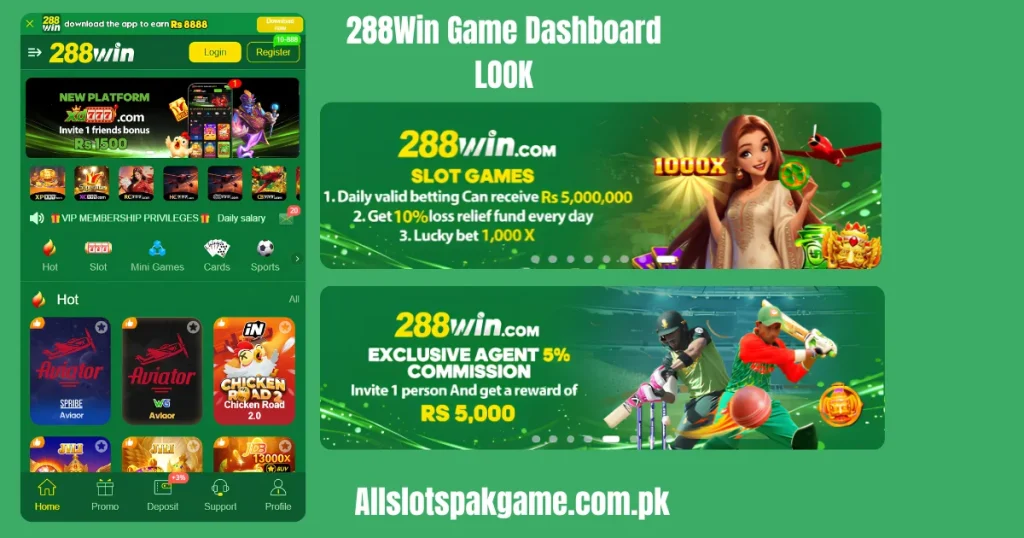
The home screen of 288 Win Game starts with a download strip above the brand logo. Login and Register sit beside the header, followed by a large banner area and smaller platform icons.
An announcement strip separates these elements from the category row. Below it, cards appear in three columns with artwork, names and provider labels.
The 288Win dashboard also has floating contact and sharing buttons. A TOP control appears further down the page, providing a visible shortcut for returning upward.
Moving Between the Main Sections
288 Win Game keeps five destinations along the bottom: Home, Promo, Deposit, Support and Profile. Yellow highlighting identifies the selected destination.
- Home: Browse categories, individual titles and provider collections.
- Promo: View activity banners and the tabs above them.
- Deposit: Reach the entry labelled for adding account funds.
- Support: Open customer assistance and the Message Center.
- Profile: Find records, account controls and personal settings.
The footer provides another route to several sections. It groups activity links, game categories and support shortcuts into columns.
How the Game Library Groups Its Content
288 Win Game separates its library into Hot, Slot, Mini Games, Cards, Sports, Live and Fishing. Categories contain either individual entries or collections associated with named providers.
Featured Titles and Provider Collections
Hot includes Aviator, Chicken Road 2.0, Fortune Garuda 1000, Fortune Garuda 500, Piggy Bank and Fortune Gems 3. Additional cards include Crazy777, Wild Bounty Showdown, Money Coming and Fortune Gems 2.
Slot displays collections labelled JILI, WG, PG, JDB, FC and PP. Mini Games includes a Crash card alongside other provider entries.
Cards, Sports, Live and Fishing
Cards shows JILI Cards, WG Cards and MG Cards. Sports lists SABA Sports, WG Sports and IM Sports, using different sports imagery on the collection cards.
Live includes EVO Live, SEXY Live and Ezugi Live. Fishing presents JILI, WG and JDB collections among its visible entries. Several groups provide Expand controls with additional item counts. These controls indicate more content beyond the initial row.
Within 288Win, headings identify collections. Check individual entries for their rules.
Understanding the Activity Page
The Promo area of 288 Win Game has Event, Mission, VIP, Unclaimed and Interest tabs. Event displays a vertical list of banners. The side controls include All, cooperate, History and Refresh rewards.
Some banners describe platform activities, while others feature separate brands. Their presence does not establish that every linked destination belongs to the same operator.
The 288 Win game activity list mentions mystery boxes, scheduled cashback, rankings and new-member offers. These are descriptions used within the interface. A banner alone does not show complete eligibility rules, expiry dates or whether a particular account qualifies. Read the detailed terms before interpreting an amount as available.
Mission, Membership and Rebate Labels
288 Win Game lists Mission and VIP as separate tabs, while the footer also includes Rebate, Fund and Blind box links. These labels distinguish tasks, membership information and records.
Event banners refer to daily, weekly and monthly membership benefits. Another banner displays a rebate figure of up to 3.0%. Neither presentation supplies a complete calculation table in the visible page.
The words Pension Fund and Interest also appear in the interface. These labels do not establish an employment pension or a regulated savings product. Their meaning depends on the platform’s own terms, which require separate examination.
Invitation Tools and Sharing Messages
288 Win Game places an Invite entry in Profile and the footer. Event also contains several invitation banners with different descriptions, including category-related activities and random mission rewards.
These messages should not be combined into one fixed benefit. Each activity may have separate requirements, and a displayed percentage does not explain how the platform calculates it.
Before sharing a link, inspect its destination and understand which information it contains. Avoid adding private account details to a public message. The Help Center includes a question about where to share a referral code, providing a relevant place to look for further explanation.
Registration Fields and Account Choices
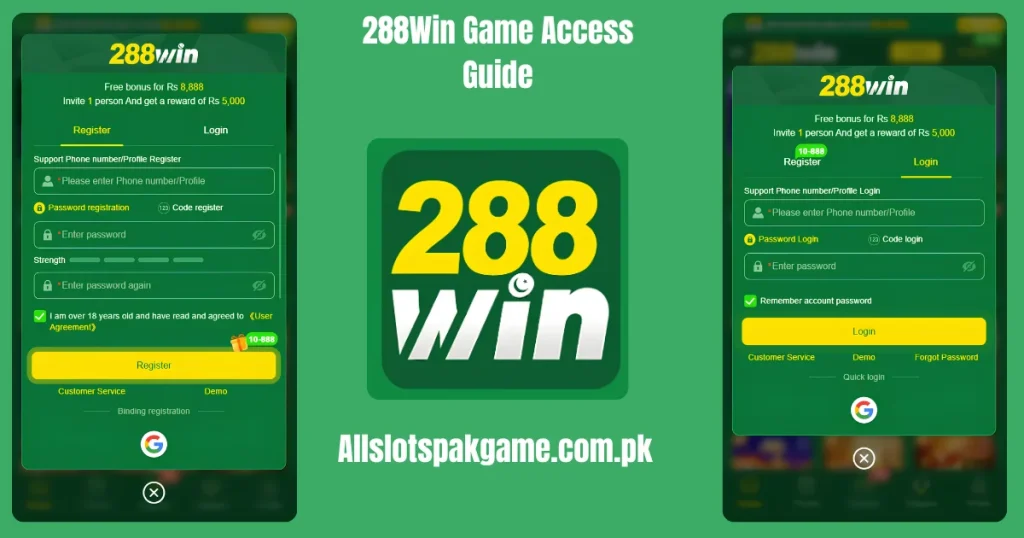
The registration form in 288 Win Game supports a phone number or profile identifier. It shows Password registration and Code register as separate choices.
The password route contains a password field, a strength indicator and a confirmation field. Eye icons appear beside the password entries. An age checkbox states that the user is over eighteen and agrees to the User Agreement.
The 288 Win game form also lists Customer Service, Demo and a Google binding option below the main button. Their availability on the form does not confirm that every route completes successfully. Review the agreement and check the selected method before submitting personal details. Before installing an APK, readers can review our CK999 Game guide for additional information about download details, account access, and app permissions.
Login Controls and Password Recovery
288 Win Game provides Password Login and Code login options. The visible password form asks for a phone number or profile identifier followed by a password.
Below the fields, Remember account password appears beside a checkbox. The form also includes Customer Service, Demo, Forgot Password and a Google quick-login symbol.
For an access problem, use the recovery option associated with the account. Keep passwords and verification codes private, and check the page address before entering either one.
What the Download Link Does Not Explain
288 Win Game displays Download now in the strip above the header. That link shows where the interface offers access to an app package, but the visible strip does not provide an APK version, file size or minimum Android requirement.
Those details should therefore remain unspecified in a factual guide. A familiar logo cannot establish the source or contents of a downloaded file. Check publisher information, package details and requested permissions before deciding whether the application suits your device.
Profile, Records and Security Shortcuts
The Profile page of 288 Win Game begins with a request to log in or register. Beneath it are Withdraw, Deposit, Interest and Fund shortcuts.
My Records carries the description “Details, records, reports, recover balance.” Manage withdrawal appears as a separate entry. The page then lists Invite, Profile, Security Center, Find us, Language, FAQ, Reward Feedback, Login device and Night mode.
The 288Win Language row displays English. Security Center and Login device provide visible destinations, although their internal settings are not shown here. Their names alone cannot confirm which protections an account has enabled. Likewise, coloured badges beside rows should not be mistaken for completed verification.
Support, Notices and Help Search
288 Win Game opens a Message Center with Support, News, Notice and Marquee tabs. News and Notice carry number badges, helping distinguish message groups.
The Support panel displays a customer-service entry and contact sections for Other Support, Telegram Support and Facebook. A WhatsApp contact card also appears. The stated availability is a platform claim rather than a measured response time.
The 288Win Help Center includes a search field and topic buttons. Visible questions cover performance calculations, performance levels, referral-code sharing and agent-related information. Describe the problem clearly while keeping passwords and verification codes out of the conversation.
Pros and Cons of the Visible Layout
| Pros | Cons |
|---|---|
| Bottom navigation keeps main sections accessible. | Floating buttons cover portions of some cards. |
| Category headings separate different collections. | Artwork and badges make the page visually busy. |
| Password and code options appear on account forms. | Download specifications are absent from the header. |
| Help search and message tabs organise assistance. | Activity banners leave detailed conditions unclear. |
| Profile groups records and security shortcuts. | Signed-out views do not reveal personal settings. |
Frequently Asked Questions
Can the platform work without an internet connection?
Offline support is not established. Do not assume that account pages or online collections remain usable without a connection.
Is there a confirmed iPhone application?
The available information does not establish an App Store listing or a supported iOS installation route.
Does uninstalling the app delete an account?
Removing an application usually removes its local installation. Account deletion requires checking the service’s separate deletion process.
Can users change the text size?
A dedicated text-size control is not shown. Device accessibility settings may help, depending on how the interface responds.
Is a desktop edition available?
No dedicated desktop package or computer requirements are established by the available information.
Final Overview
288 Win Game places browsing, activities, account tools and assistance within a consistent layout. Its menus are understandable once readers separate page labels from banner claims. Check detailed conditions, protect personal information and use the relevant help section whenever a control or account message remains unclear.
Download links
How to install 288 Win Game APK Download New Earning APP In Pakistan APK?
1. Tap the downloaded 288 Win Game APK Download New Earning APP In Pakistan APK file.
2. Touch install.
3. Follow the steps on the screen.