
V 9 Game Download APK Best Pakistani Earning App 2026
12 Oct 2026
15 MB
V1.3
Android 5.1+
3000+
Description
Introduction to V 9 Game
For readers comparing mobile platforms, the most useful starting point is a clear distinction between what a page shows and what a description claims. This guide does not assume that a feature exists just because similar platforms offer it. The term V 9 Game appears in searches in different forms, so check the page address before relying on any instructions.
V 9 Game is the subject of this guide to mobile access, account use, game navigation and common technical problems. It explains how to approach the main areas of a gaming service, what to review before creating an account, and how to respond when a page or the app does not work as expected. The aim is to provide practical guidance without presenting unverified details as confirmed features.
The name alone does not establish ownership or current features. Read the service’s own instructions and terms before making account or payment decisions.
What Is V 9 Game?
The name V9 may appear on different pages, so check the address, operator information and user terms before using a site. V9 is a spelling variation in some descriptions. A similar name or logo does not prove that two pages belong to the same service.
Look for the main navigation, game list, account options and help information. The platform should make its basic terms easy to locate. These visible details are more useful than broad claims about V 9 Game popularity. Read the V 9 Game terms before sharing personal information.
Interface and Main Menu
Menus usually separate game browsing, account settings and support. Labels and positions differ, so use the controls shown on your screen. A home area may return to the main page, while a profile area may contain user settings.
Read button labels before selecting them or entering personal details. If a menu item does not open, check the connection and reload the page once. A game list may use names, thumbnails or filters. Read the instructions for an activity before starting.
Mobile gaming platforms can organise their menus and account features in different ways. For another example, our X 92 Game guide explores how a platform presents its dashboard, game collections, and account options.

Common Game Category Types
The descriptions below explain common category labels, not confirmed features. Use the current interface to identify which options are actually listed.
Slots
Slot-style games show symbols on reels, with rules and special features that differ by title. Read the selected game’s instructions.
Mini Games
Mini games usually have short rounds or simple objectives. Check the on-screen guide for each title’s controls.
Card Games
Card games use different objectives and scoring rules. Read the instructions for the selected title.
Fishing Games
Fishing games may involve selecting targets or using on-screen controls. Scoring and tools depend on the title.
Live Games
A live-game section, if present, may show a host or streamed table. Read the activity’s rules and access conditions.
Sports and Other Categories
Sports or specialised categories may also appear. Check the current menu and read the rules for each listed option.
Registration and Login
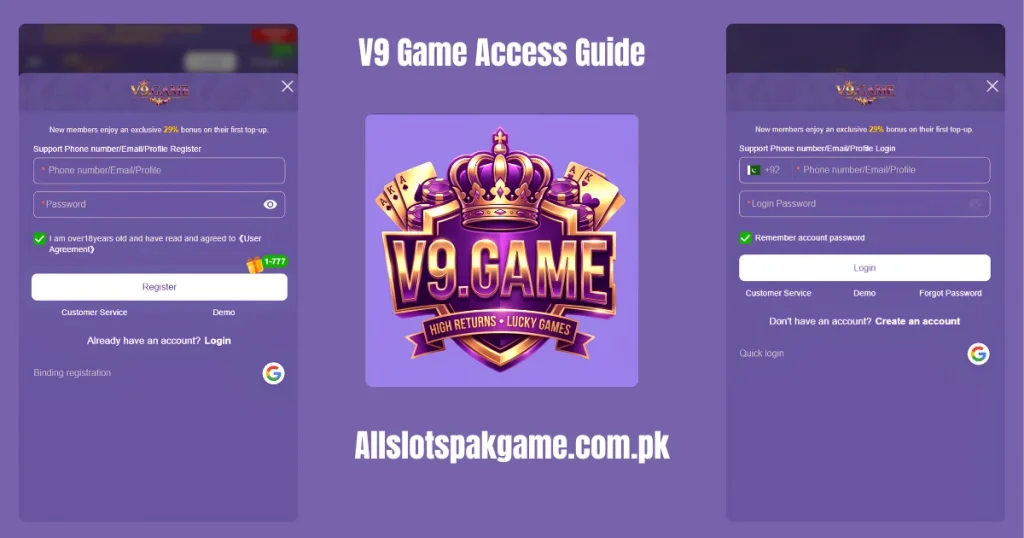
If the form asks you to confirm terms, read the linked text rather than ticking the box automatically. Check spelling in your contact details, because an error can affect later account messages. V 9 Game account steps should match the instructions displayed on the page. Do not use a third-party form or a copied link if you cannot verify that it belongs to V 9 Game.
Registration uses a form with fields set by V 9 Game. Read the user terms and age requirements, and provide only the information requested. Do not use another person’s details.
At login, enter your account details carefully. An error message may point to a typing mistake, connection issue or another requirement.
Use a unique password. Follow V 9 Game’s recovery instructions when needed, and never share passwords or one-time codes with unexpected contacts.
Mobile Access and APK Details
For browser access, you do not need the app; install it only if the platform offers a suitable source and you choose to use it. The apk is an installation file, not proof of an official release. A search result or social post may use the same words without being connected to the original service. Check the source first and avoid installation when publisher details are missing.
V 9 Game access may be through a browser; an APK is an Android installation file. A mobile site may work in a browser without offering an APK.
Before installing an APK, check its source, publisher details and permissions. An installation prompt does not prove a file is genuine. Avoid unknown links or files with an unclear origin.
Check storage, Android compatibility and requested permissions. Keep the device updated and avoid granting access that has no clear purpose. Keep source and version details for troubleshooting.
Deposit and Withdrawal Guide
V 9 Game payment methods, limits, fees and processing times depend on the service. Read the current payment screen and terms before making a transaction.
Keep the transaction reference and date private. If a transaction is pending, review its status before trying again. Use the service’s listed contact method and share only the details needed to explain the issue.
Never disclose passwords, payment PINs or verification codes. Be wary of promises or requests for extra payment outside the stated process. Pause if instructions are unclear.
Privacy and Account Safety
The platform should provide enough information for a reader to understand its data practices and terms. Use the platform’s current information for decisions. If you cannot find an explanation of how information is handled, avoid submitting optional personal details until the uncertainty is resolved. V9 Game and V9 are name variations in text, not independent evidence of ownership or safety.
Read the privacy information for V 9 Game to learn what data is collected and how it is used. Look for operator details and a contact method. Missing information is a reason to pause before sharing data.
Use a screen lock and log out fully on shared devices. Avoid saving passwords on public computers. Treat unexpected sign-in links carefully and open the service through an address you have checked.
Privacy information explains data handling; device permissions control application access. Review both and remove unnecessary permissions.
Common Access Problems
When troubleshooting, change one thing at a time and note what happens. This makes it easier to identify whether the issue is caused by the connection, browser, device or service. Avoid installing unofficial repair tools or sharing account details with people who promise to fix access remotely.
The page loads slowly. Open another site to test the connection. Switch between Wi-Fi and mobile data if possible, reload once and close unused tabs.
The page does not open. Check the address and browser message. If other sites work, the problem may be with this page or service.
Login is rejected. Re-enter the details and read the error. Use account recovery if available; do not try random passwords.
An APK will not install. Check the source, storage, compatibility and error message. Do not disable device protections for an unclear file.
The application closes unexpectedly. Restart the phone and check compatibility. Consider local data before removing it; reinstalling an unverified file is not a reliable fix.
A transaction has not updated. Check its status and reference, keep the receipt and contact the listed support route if needed. Avoid duplicate requests.
Limitations and Important Details
Information can differ between websites that use similar names. The spelling V 9 Game or V9 does not independently confirm that a page is official. Check the full address and any operator details before signing in. A page that loads successfully also does not prove that its claims, payment terms or downloads are trustworthy.
Current service details determine its operator, categories, APK availability and payment terms. Old pages may be outdated, so use the information shown on the page you access.
This guide covers general navigation and mobile use; it does not confirm licensing or guarantee specific features. Use current information and avoid sharing details when the recipient is unclear.
Frequently Asked Questions
How do I identify the correct page?
Compare the complete address with the service information you intended to visit. Do not rely only on a logo, search result title or message link.
Is an APK always available?
No. A browser-based site may not offer a separate Android file. The app and the apk are not interchangeable terms. Check the apk source before installing the apk. Install only from an identifiable source.
What should I do if I cannot log in?
Check the entered details and use the service’s recovery option if available.
How can I check a delayed transaction?
Review the status, keep the reference and follow the listed support process.
What should I check before creating an account?
Read the terms, age requirements and privacy information before submitting personal details.
Final Words
Use V 9 Game carefully by checking the page address, reading the terms, and following the instructions provided. Before creating an account or installing an APK, review the available source details and privacy information.
When using V9 Game, avoid sharing personal information if important details remain unclear. Check payment conditions before making transactions, and use the listed support options when problems arise. A careful approach to V 9 Game can help you make more informed decisions.
Download links
How to install V 9 Game Download APK Best Pakistani Earning App 2026 APK?
1. Tap the downloaded V 9 Game Download APK Best Pakistani Earning App 2026 APK file.
2. Touch install.
3. Follow the steps on the screen.